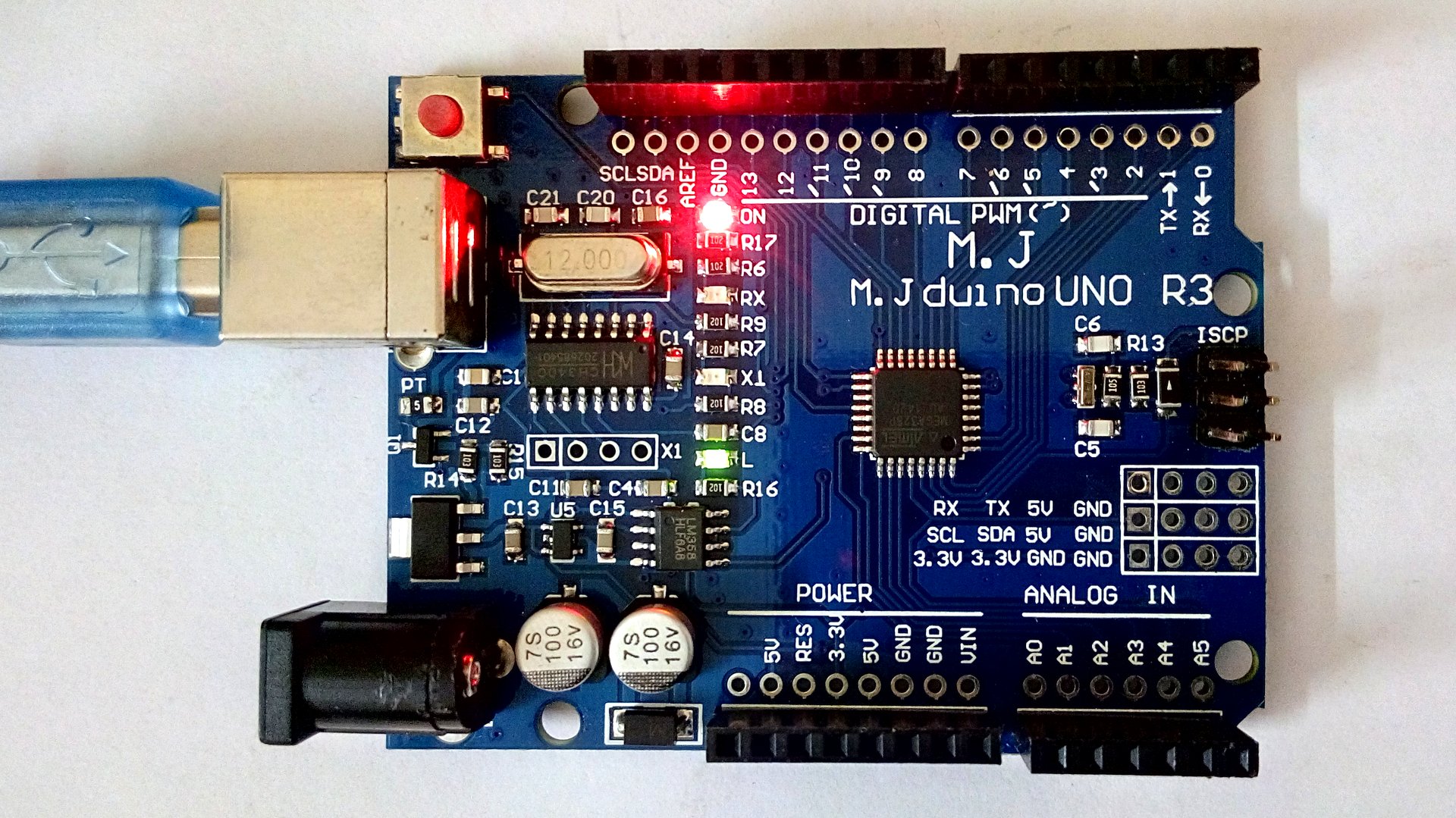
電子サイコロというものを見たことがあるでしょうか。LED回路などでサイコロの目をつくり、電子回路で操作・表示するものです。
乱数を生成し、各LEDを点灯させるというのはもし回路を自分で組むとしたら面倒な話です。
こんな作業も Arduino があるときちんと組めます。乱数はライブラリを利用し、各LEDへの出力をプログラムで操作します。


writeXML(Hashtable directory, string fileName):readXML(string fileName):
javac -classpath "JARファイルのあるディレクトリ;." WeatherApp.javaこれで、コマンドラインからシカゴの気温が検索できます。


CREATE TABLE IF NOT EXISTS `notes` (
  `updated` timestamp NOT NULL DEFAULT CURRENT_TIMESTAMP,
  `id` int(11) NOT NULL AUTO_INCREMENT,
  `title` text COLLATE utf8_unicode_ci NOT NULL,
  `description` text COLLATE utf8_unicode_ci NOT NULL,
  `videoid` text COLLATE utf8_unicode_ci NOT NULL,
  `imagefile` text COLLATE utf8_unicode_ci NOT NULL,
  `docnum` text COLLATE utf8_unicode_ci NOT NULL,
  `shortdesc` text COLLATE utf8_unicode_ci NOT NULL,
  `onhold` int(11) NOT NULL,
  `registered` timestamp NOT NULL DEFAULT '0000-00-00 00:00:00',
  PRIMARY KEY (`id`)
) ENGINE=InnoDB  DEFAULT CHARSET=utf8 COLLATE=utf8_unicode_ci
AUTO_INCREMENT=61 ;
<html>
<head>
<style>
textarea
{
width:1000px;
height:500px;
}
</style>
</head>
<body>

<?
$text=$_REQUEST['text'];

$text=htmlspecialchars($text);

echo <<<END
<form action="html.php">
<textarea name="text">$text</textarea>
<input type="submit" value="Convert" />
</form>
END;

$html=htmlspecialchars($text);
echo <<<END
<textarea>
$html
</textarea>
END;
?>
</body>
</html>
 |
| Mandelbrot |
public enum Periodic{PERIODIC,PREPERIODIC,NONPERIODIC};
Periodic periodic=Periodic.NONPERIODIC;
switch(isPeriodic())
            {
            case PERIODIC:
                System.out.println("f is periodic.");
                break;
            case NONPERIODIC:
                System.out.println("f is not periodic.");
                break;
            case PREPERIODIC:
                System.out.println("f is pre-periodic.");
                break;
            }
 |
| 作りかけのメトロアプリ |

<html>
<head>
<style>
textarea
{
width:1000px;
height:500px;
}
</style>
</head>
<body>

<?
$text=$_REQUEST['text'];

echo <<<END
<form action="table.php">
<textarea name="text">$text</textarea>
<input type="submit" value="Convert" />
</form>
END;

$text=$_REQUEST['text'];
$text=htmlspecialchars($text);
$list=explode("\n",$text);
$html="";
foreach($list as $line)
  {
    $columnList=explode(",",$line);
    $column=implode("</td><td>",$columnList);
    $html.="<tr><td>$column</td></tr>";
  }
$html="<table><tbody><pre>
$html
</pre></tbody></table>
";
echo <<<END
<textarea>
$html
</textarea>
$html
END;
?>
</body>
</html>
 |
| Visual Studio 2013 部品を可変サイズにする |
 |
| 部品の幅を可変にする |
<div id="menu">
<ul id="menu">
<li>
Click Here
</li>
</ul>
</div>
それで、クリック時に呼び出す関数を指定したとします。
    $(document).ready(
 function()
 {
     $("ul#menu > li").click(function(){
     alert("here");
     });
 });
これだと、Firefoxは意図を察して動いてくれるのですが、IEだとだめだめです。
$(document).ready(function(){
    // 1 when any menu is shown
    var menuOn=0;

    $("ul#menu > li").click(function(){
        // hide all menu items
        $("ul#menu > li").each(function(){
            $(this).find('ul').css("display","none");
          });
        $(this).find('ul').css("display","block");
        menuOn=1;
      });

    // hide/show menu items
    $("ul#menu > li").hover(function(){// show menu when the cursor is over
        if(menuOn==0)
          {
            $(this).find('ul').css("display","block");
          }
      },
      function(){// hide menu when the cursor is off
        if(menuOn==0)
          {
            $(this).find('ul').css("display","none");
          }
      });

    // hide all menus and clear the flag
    $("#canvas").click(function(){
        if(menuOn==1)
          {
            $("ul#menu > li").each(function(){
                $(this).find('ul').css("display","none");
              });
          }
        menuOn=0;
      });
  });
スタイルシートです。
ul#menu,
ul#menu ul
{
    list-style:none;
    z-index:1;
    position:relative;
}
ul#menu ul li
{
    line-height:25px;
    width:100px;
    height:25px;
    background:#2D435A;
}
ul#menu ul li a
{
    text-decoration:none;
    color:#cccccc;
    margin-left:10px;
    font-size:14px;
    text-align:none;
}
ul#menu ul li#heading a,
table#submenu a#heading
{
    color:white;
    font-size:16px;
    margin-left:0px;
}
ul#menu ul
{
    display:none;
}
ul#menu,
ul#menu li,
ul#menu ul,
ul#menu ul li
{
    margin:0px;
    padding:0px;
}
ul#menu li,
ul#menu ul li
{
    color:white;
}

div#menubar
{
    width:100%;
    background-image:url('../../../../images/topNav_bkgd.jpg');background-repeat:x-repeat;
}

ul#menu
{
    width:960px;
    margin:0px auto;
    padding:0px;
}
ul#menu li
{
    height:25px;
    line-height:25px;
    display:inline-block;
    vertical-align:top;
    color:white;
    text-align:center;
    width:130px;
    border:0px;
    *display:inline;
    *zoom:1;
}
ul#menu li ul
{
    width:400px;
    height:400px;
    background:#2D435A;
    opacity:.9;
    filter:alpha(opacity=90);
    -ms-filter:"alpha(opacity=90)";
    -moz-opacity:.9;
    -khtml-opacity:.9;
    text-align:left;
}
ul#menu li ul li
{
    text-align:left;
    border:none;
    padding-top:10px;
    padding-left:10px;
}
table#submenu
{
    margin:0px;
    margin-top:10px;
    margin-left:10px;
    border:0px;
    border-collapse:collapse;
    width:400px;
}
table#submenu td
{
    text-align:left;
    vertical-align:top;
}
div#canvas
{
    width:100%;
    text-align:center;
}
div#position
{
    width:960px;
    margin:0px auto;
    text-align:left;
}
HTMLの部分を示します。
<div id="menu">
<ul>
<li>Home
    <ul>
<li><a href="http://www.blogger.com/default.htm" title="Noritake VFD">Home</a>
      </li>
</ul>
</li>
</ul>
</div>
    $(document).ready(function()
        {
     $('ul#menu > li').click(function(){
         $(this).next().slideToggle();
     });
        });
    <ul id="menu">
      <li>Homepages</li>
      <ul>
   <li><a href="http://easai.web.fc2.com/biology/">Biology</a></li>
   <li><a href="http://easai.web.fc2.com/travel/">Travel</a></li>
   <li><a href="http://easai.web.fc2.com/phyla/">Phyla</a></li>
   <li><a href="http://easai.web.fc2.com/homepage/">Homepage</a></li>
   <li><a href="http://easai.web.fc2.com/biochemistry/">Biochemistry</a></li>
   <li><a href="http://easai.web.fc2.com/neuroscience/">Neuroscience</a></li>
      </ul>
      <li>Lignuistics</li>
 <ul>
            <li><a href="http://easai.web.fc2.com/linguistics/">Linguistics</a></li>
 </ul>
      <li>Nature series</li>
 <ul>
   <li><a href="http://easai.web.fc2.com/aves/">Aves</a></li>
   <li><a href="http://easai.web.fc2.com/eutheria/">Eutheria</a></li>
   <li><a href="http://easai.web.fc2.com/lepidoptera/">Lepidoptera</a></li>
   <li><a href="http://easai.web.fc2.com/odonata/">Odonata</a></li>
 </ul>
    </ul>
スタイルシートもあげておきます(2013-12-05)。
body
{
display:box;display:-moz-box;display:-webkit-box;display:-ms-flexbox;
}
ul#menu
{
width:180px;
font-family:sans-serif;
font-size:18px;
color:gray;
margin-left:10px;
margin-right:60px;
}
ul#menu,
ul#menu ul
{
  list-style:none;
  padding:0px;
}
ul#menu li
{
    border:1px solid #e0e0e0;
    background:#ececec;
    height:50px;
    padding:10px;
}
ul#menu ul
{
    display:none;
}
ul#menu ul li
{
    background:#fafafa;
    font-size:16px;
    height:30px;
}
ul#menu ul a
{
    text-decoration:none;
    color:gray;
}
 |
| Twitter Remove Recommendations |
@namespace url(http://www.w3.org/1999/xhtml);

@-moz-document domain("twitter.com") {

div.empty-timeline-footer
{
display:none;
}

}
@namespace url(http://www.w3.org/1999/xhtml);

@-moz-document domain("news.google.com") {

img.esc-thumbnail-image,
div.item-image-wrapper,
div.media-strip-video-wrapper
{
display:none;
}

}
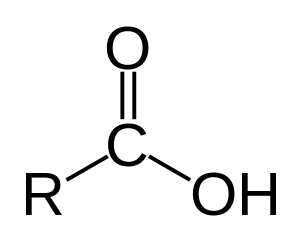 |
| カルボン酸 |
 |
| 炭酸 |
 |
| ヒドロキシ酸 |
    try
      {
 // 関数本体
      }
    catch(Exception $e)
      {
 echo trace(debug_backtrace());
      }
function trace($traceList)
{
  $html="";
  foreach($traceList as $debugInfo)
    {
      $pathInfo=pathinfo($debugInfo['file']);
      $baseName=$pathInfo['basename'];
      $funcName=$debugInfo['function'];
      $lineNum=$debugInfo['line'];
      $html.="@$funcName ($baseName: $lineNum)";
    }
  return $html;
}
function endsWith($haystack,$needle,$case=FALSE)
{
  $len=mb_strlen($needle);
  if(0<mb_strlen($haystack) && mb_strlen($needle)<=mb_strlen($haystack))
    $res= (substr_compare($haystack,$needle,-$len,$len,$case)==0);
  return $res;
}

function startsWith($haystack,$needle,$case=FALSE)
{
  $res=false;
  if(mb_strlen($needle)<=mb_strlen($haystack))
    $res=(substr_compare($haystack,$needle,0,mb_strlen($needle),$case)==0);
  return $res;
}
     var y=getY(document.getElementById("top"));
     $('body,html').animate({
      scrollTop: y
   }, 800);
 |
| Chicago |
 |
| IT Pro Evangelist: Brian Lewis |
 |
| Chicago |

<div style="display:box;display:-moz-box;display:-webkit-box;position:absolute;top:100px">
<div style="width:100px;height:100px;border:1px solid blue"></div>
<div style="width:100px;height:100px;border:1px solid blue"></div>
</div>
$filter="ga:hostname!=ホスト名";
$ga->requestReportData(homepageId,null,array('pageviews','visits','bounces','entrances','timeOnSite','exits','newVisits'),null,$filter,$startDate,$endDate);
$(function(){

$('img').each(function(){

if(!this.complete){
$(this).hide();
return;
}

});

});
#import <stdio.h>
#import <foundation/foundation.h>
#import <Foundation/NSObject.h>

@interface Verb:NSObject
-(void)print: (NSString*)stem;
@end

@implementation Verb
-(void)print: (NSString*)stem
{
  char* str=[stem UTF8String];
  printf("%sim\n",str);
  printf("%sis\n",str);
  printf("%si\n",str);
  printf("%sime\n",str);
  printf("%site\n",str);
  printf("%si\n",str);
}
@end

int main()
{
  NSString *stem=@"rozumim";
  id obj=[Verb alloc];
  [obj print:stem];
  return 0;
}
GNUSTEP_MAKEFILES=c:/GNUstep/GNUstep/System/Library/Makefiles
include $(GNUSTEP_MAKEFILES)/common.make

TOOL_NAME = verb
verb_OBJC_FILES = verb.m

include $(GNUSTEP_MAKEFILES)/tool.make
#import >stdio .h=".h">
#import >foundation bject.h="bject.h">

@protocol ToString
-(void)toString;
@end

@interface Test:NSObject>tostring>
@end

@implementation Test
-(void)toString
{
  printf("This is class Test.\n");
}
@end

int main()
{
  id obj=[Test alloc];
  [obj toString];
  return 0;
}
#import <stdio.h>
#import <Foundation/NSObject.h>

@interface Test:NSObject
{
  int index;
}
- (void) hello;
- (void) setIndex:(int) i;
+ (void) dump;
@end

@implementation Test
- (void) setIndex:(int) i
{
  self->index=i;
}
-(void)hello
{
  printf("Hello NSObject %d\n",self->index);
}
+(void)dump
{
  printf("Class method = static");
}
@end

int main()
{
  [Test dump];
  return 0;
}
#import <stdio.h>
#import <Foundation/NSObject.h>

@interface Test:NSObject
-(void) hello;
@end

@implementation Test
-(void)hello
{
  printf("Hello NSObject\n");
}
@end

int main()
{
  id obj=[Test alloc];
  [obj hello];
  return 0;
}
gcc nsclass.m -I c:/GNUstep/GNUstep/System/Library/Headers -L c:/GNUstep/GNUstep/System/Library/Libraries -lobjc -lgnustep-base
#import <stdio.h>
#import <Foundation/NSObject.h>

@interface Test:NSObject
{
  int index;
}
- (void) hello;
- (void) setIndex:(int) i;
@end

@implementation Test
- (void) setIndex:(int) i
{
  self->index=i;
}
-(void)hello
{
  printf("Hello NSObject %d\n",self->index);
}
@end

int main()
{
  id obj=[Test alloc];
  [obj setIndex:10];
  [obj hello];
  return 0;
}
(defun replace-tags-region (from-string to-string begin end)
"Replaces from-string to to-string in the region from begin to end."
  (let ((len (- (length to-string)(length from-string))))
    (goto-char begin)
    (while (search-forward from-string end t)
      (replace-match to-string t)
      (setq end (+ end len)))))

(defun replace-tags-list (tag-list)
"Takes a list of (from-string to-string) and replaces all from-string to to-string in the buffer."
  (replace-tags-region (car tag-list) (cadr tag-list)(point-min)(point-max)))


;; Usage:
;; (setq tag-list '(("TABLE" "table")("TD" "td")("TR" "tr")))
;; (replace-tags tag-list)

(defun replace-tags (tag-list)
"Takes a list of lists of (from-string to-string) and replaces all from-string to to-string in the buffer."
  (mapcar 'replace-tags-list tag-list))

(defun create-end-tag (tag-name)
  "Creates closing tag from the given tag-name."
  (concat "</" tag-name ">"))

(defun create-half-begin-tag (tag-name)
  "Creates opening tag from the given tag-name."
  (concat "<" tag-name " "))

(defun create-attribute-tag (tag-name)
  "Creates attribute string from the given tag-name."
  (concat " " tag-name "=\""))

(defun create-begin-tag (tag-name)
  "Creates opening tag from the given tag-name."
  (concat "<" tag-name ">"))


;; Usage:
;;(setq tag-list '("TABLE" "TD" "B" "BR" "A" "HTML" "NOSCRIPT" "SCRIPT" "HEAD" "BODY" "TR" "TITLE" "I"))
;;(mapcar (lambda (x)(create-replacement-list 'create-end-tag x)) tag-list)
(defun create-replacement-list (create-list tag-name)
"Creates a list of tag name and lowercase tag name lists."
  (cons (funcall create-list tag-name) (list (funcall create-list (downcase tag-name)))))

(defun lowercase-html-tags()
"Converts uppercase HTML tag names to lowercase."
  (interactive)
  (let* ((tag-list '("TABLE" "TD" "B" "BR" "A" "HTML" "NOSCRIPT" "SCRIPT" "HEAD" "BODY" "TR" "TITLE" "I"))
  (attribute-list '("VALIGN" "ALIGN" "WIDTH" "HEIGHT" "BOTTOM" "CLASS" "BGCOLOR" "BORDER" "LEFT" "RIGHT" "TOP" "CELLPADDING" "CELLSPACING" "BORDERCOLOR" "CENTER" "MIDDLE" "HREF" "COLSPAN" "ROWSPAN" "SRC" "onMouseOver" "onMouseOut" "ALT" "NAME" "ID" "VSPACE" "LINK" "META" "LEFTMARGIN" "TOPMARGIN" "MARGINWIDTH" "MARGINHEIGHT" "onLoad" "BACKGROUND" "TYPE" "HTTP-EQUIV" "CONTENT" "REL" "LANGUAGE"))
  (half-tag-list '("TABLE" "TD" "A" "IMG" "LINK" "META" "SCRIPT" "BODY" "TR" "DIV"))
  (replacement-end-tags (mapcar (lambda (x)(create-replacement-list 'create-end-tag x)) tag-list))
  (replacement-begin-tags (mapcar (lambda (x)(create-replacement-list 'create-begin-tag x)) tag-list))
  (replacement-half-begin-tags (mapcar (lambda (x)(create-replacement-list 'create-half-begin-tag x)) half-tag-list))
  (replacement-attribute-tags (mapcar (lambda (x)(create-replacement-list 'create-attribute-tag x)) attribute-list)))
    (replace-tags replacement-attribute-tags)
    (replace-tags replacement-end-tags)
    (replace-tags replacement-half-begin-tags)
    (replace-tags replacement-begin-tags)))

    display: -webkit-box;
    display: -moz-box;
    display: box;
内部のDIV要素がきれいに並んでくれます。
ただし、上記のようにIEには対応していません。
そこで、この flexie.js を導入すると、見事に横並びボックスが実現できます。
ダウンロード:http://flexiejs.com/
これでページのHTMLタグが整理できそうです。
Dim objVBCOMPO     As Object
        For Each objVBCOMPO In ActiveWorkbook.VBProject.VBComponents
            With objVBCOMPO.CodeModule
                If .CountOfLines <> 0 Then .DeleteLines 1, .CountOfLines
            End With
            If (objVBCOMPO.Type = vbext_ct_StdModule Or objVBCOMPO.Type = vbext_ct_MSForm) Then
                ActiveWorkbook.VBProject.VBComponents.Remove objVBCOMPO
            End If
        Next objVBCOMPO
        Set objVBCOMPO = Nothing
End Sub


 $(document).ready(function(){
  $(".millimeters").hide();
  $("#convertIN").click(function(){
   $(".millimeters").hide();
   $(".inches").show();
      });
  $("#convertMM").click(function(){
   $(".millimeters").show();
   $(".inches").hide();
      });
     });
     $(document).ready(function(){
         $(".クラス名").click(function (event){
             event.preventDefault();
             document.location="飛ばしたい先のアドレス";
         });
     });

$cfg['Servers'][$i]['user'] = 'ユーザー名';
$cfg['Servers'][$i]['password'] = 'パスワード';
;error_reporting = E_ALL | E_STRICT
error_reporting = E_ERROR
short_open_tag = On

extension=php_curl.dll
コントロールパネルもアップグレードされておりました。
<audio autoplay="false" controls="true" src="ファイル名"></audio>
改造したファイルをepub形式に変換するときは、単に圧縮するだけでは.epub形式とはなりません。
Windows上でepubを作成するには、
#include<iostream>
using namespace std;
int main()
{
  int arraytest[5]={1,2,3,4,5};
  for(int i:arraytest)
    cout<<i;
  cout<<endl;
  for(int &i:arraytest)
    i=0;
  for(int i:arraytest)
    cout<<i;
}
コンパイラオプションは以下の通り。
$> g++ -std=c++0x range.cc
#include <iostream>
#include <chrono>

int main()
{
  auto tp=std::chrono::system_clock::time_point();
  std::time_t t=std::chrono::system_clock::to_time_t(tp);
  std::cout << std::ctime(&t)<<std::endl;

  std::chrono::seconds sec(10);
  std::chrono::minutes min(3);
  auto result=sec+min;
  std::cout << result.count() << std::endl;
}
コンパイラのオプションは以下の通り。
/usr/bin/g++-4 -std=c++0x chrono.cppc++11ではラムダ式も使えます。
std::cout << [](int x, int y){return x+y;}(1,2) << std::endl;
public class VarLen
{
    int sum(int ... list)
    {
 int s=0;
 for(int i:list)
     {
  s+=i;
     }
 return s;
    }

    public static void main(String args[])
    {
 VarLen varLen=new VarLen();
 System.out.println(varLen.sum(1,2,3,4,5,6,7,8,9,10));
    }
}
INSERT INTO pages SELECT '',title,contents,url FROM pages WHERE ID=$id
  <div style="padding-bottom:0px;">
      <div style="float:left;">
Floating block
      </div>
  </div>


<div style="margin: 20px 0;border:1px solid red;"></div>
 public class Closure
{
    class Test{};

    Closure()
    {
    final int i=0;
    (new Test()
    {
        void test()
        {
        System.out.println(i);
        }
        }).test();
    }

    public static void main(String args[])
    {
    Closure closure=new Closure();
    }
}
もちろん値は変更できません。:)
function getCommonPos($s0,$s1)
{
  $len=strlen($s0);
  $len1=strlen($s1);
  if($len1<$len)
    {
      $len=$len1;
    }
  while($s0[$i]==$s1[$i] && ++$i<$len1);
  return $i;
}

function diffStr($s0, $s1)
{
  $pos=getCommonPos($s0,$s1);
  $end=strrpos(substr($s0,0,$pos),"\\");
  return substr($s0,$end);
}

function countSlashes($str)
{
  return substr_count($str,"\\");
}

function getRelativePath($p0,$p1)
{
  $p0=realpath($p0);
  $p1=realpath($p1);
  $dir=diffStr($p0,$p1);

  if(!empty($dir))
    {
      $n=countSlashes($dir);
      $path="";
      for($i=0;$i<$n;$i++)
    {
      $path.="..";
      if($i<$n-1)
        {
          $path.="\\";
        }
    }
    }
  $newDir=diffStr($p0,$p1);
  $newDir=$path.$newDir;

  if(empty($newDir))
    $newDir=".";

  return $newDir;
}
 As the Silhouette Cameo is here, I wrote a Java program to draw regular convex polygons and cut out shapes from paper. The photo shows the final product, a bookmark. You can put any of your design into 'production'. With Silhouette Cameo, you get the final products right away.

 |
| Silhouette Cameo |
 |
| Shamrock |


class Test
{
  function __call($name,$parameter)
  {
    $value=$parameter[0];
    switch($name)
      {
      case "round":
        $value=round($value);
        break;
      case "floor":
        $value=floor($value);
        break;
      case "ceil":
        $value=ceil($value);
        break;
      }
    return $value;
  }
}

$test=new Test;
echo "Rounding: round(16.4) = ".$test->round(16.4);
echo "<br />";
echo "Floor: floor(16.4) = ".$test->floor(16.4);
echo "<br />";
echo "Ceiling: ceil(16.4) = ".$test->ceil(16.4);
echo "<br />";
This actually is a potential technological breakthrough -- in that the methods bears arbitrary names that are pseudo-defined and typed not dynamically then at programming time. This is a conceptual revolution in the programming. Remember, OOP is just a different form of C's structure.
Rounding: round(16.4) = 16
Floor: floor(16.4) = 16
Ceiling: ceil(16.4) = 17


